I hope you are here because you need an optimal solution to host your application in the best performance and cost-effective way. In this tutorial, I will explain the pros & cons of a Single Page Application deployment specifically a NextJs Frontend Application.
To make this guide easier to discover and more relevant for readers, it now naturally covers nextjs firebase, firebase hosting, deploy nextjs firebase, nextjs ssr deployment, nextjs firebase hosting, and firebase cloud functions nextjs.
We all know NextJs is a framework built over reactjs and provides SSG (Static Site Generation) or SSR (Server Side Rendering) feature for our application. I have been using both of them for a long time and wanted to share my experience based on my implementation and understanding.
Let's jump into the facts ...
Firebase Deployment
Using the Firebase CLI, you can deploy your Next.js Web apps to Firebase and serve them with Firebase Hosting. The CLI understands the Next.js settings and translates them to Firebase settings. If your app includes dynamic server-side logic, the CLI deploys that logic to Cloud Functions for Firebase.
Why Firebase hosting?
I like the Firebase hosting because of its Pricing model. It is really cost-effective for a simple web application when there is not heavy traffic. My site is still growing, at the end of the month, I paid less than 100/- or (< $1). Which helps me to still continue to run the application. Please check the Firebase pricing model Pricing Model.
Initial Setup
I believe you already have a Firebase account and have already created a new Project. So considering the prerequisites, you need to install the following npm packages to continue further -
npm install -g firebase-tools
firebase login
firebase init
Select Firebase hosting and select out as the build folder
Also, install the following npm library as well (Those help for SSR application)
npm install -D firebase-admin firebase-functions
Next.js Application set up for Static deployment
For static deployment of your Next.js application, you need to update the build script under the package.json file. So please update this command and run deploy.
Open package.json file
update build command
Save the file and run
Next.js Application set up for Dynamic deployment
While doing server-side deployment, means the application leverages getServerSideProps() then you can not follow the static deployment, in such cases we have to go for dynamic deployment and run the application on the server.
After creating the Next.js application create 2 directories under your src folder -
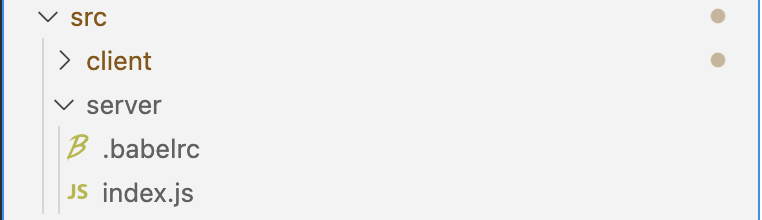
![]() Under the server directory please have the index.js file with the following content.
Under the server directory please have the index.js file with the following content.
import * as admin from "firebase-admin";
import * as functions from "firebase-functions";
import next from "next";
admin.initializeApp();
const dev = process.env.NODE_ENV !== "production";
const app = next({ dev, conf: { distDir: "dist/client" } });
const handle = app.getRequestHandler();
exports.nextServer = functions.https.onRequest((request, response) => {
  console.log("File: " + request.originalUrl);
  return app.prepare().then(() => handle(request, response));
});
Update the firebase.json file too with the following content -
{
  hosting: {
    public: "public",
    ignore: ["firebase.json", "**/.*", "**/node_modules/**"],
    rewrites: [{ source: "**", function: "nextServer" }],
  },
  functions: { source: ".", runtime: "nodejs16" },
}
Please add the Next.js application under the client folder.
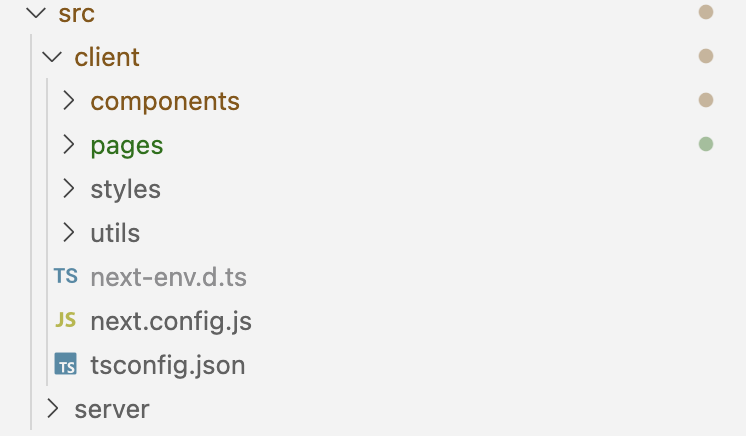
Please run the following command, to execute the application on the local environment.
npm run dev
To deploy the code to Firebase, please run the following command for deployment.
npm run build npm run deploy
Hope this tutorial finds you well, In case of any challenges let me know in the below comments section.
Happy Coding!
